A few days ago I faced the requirement to create a versionised DocC based documentation of some SPM library. I recalled my earlier work with DocC, which lacked multi-framework and version support and only offered multi-platform support. In this post I want to show you my take on creating a documentation for a Swift Package with multiple frameworks, for multiple platforms and show a way on how you can enhance the DocC created website with version support.
This is an improvement version of my original DocC setup from this post:
DocC for Multi-Platform DocumentationWhat We Are Building
The setup has two main parts:
- a build step that creates a static DocC website for one documentation version
- a deploy step that publishes that version into the correct folder on the
gh-pagesbranch.
The build step flows like this:
xcodebuild
  ↓ emits symbol graphs
.build/symbol-graphs
  ↓ passed to docc convert
MyPackage.doccarchive
  ↓ transformed for static hosting
.docs-out
  ↓ handed to the deploy step
gh-pages/<version>
The deploy step then organizes those per-version sites on the gh-pages branch:
gh-pages
├── latest
│   └── documentation
├── 1.0.0
│   └── documentation
├── 1.1.0
│   └── documentation
├── versions.json
├── version-picker.js
├── version-picker.css
├── index.html
└── 404.html
Each version lives in its own directory. latest contains documentation generated from the main branch; released versions remain available under their version number.
The key idea for versioning is that DocC generates one specific version at a time, and the structure is something we build around it.
If you want to directly jump to the full source code, head to the Full Scripts section
Requirements
This setup assumes that you have:
- Xcode with DocC support installed
- a Swift package with one or more schemes that emit symbol graphs
python3available for updatingversions.jsonxcbeautify, optionally, for nicerxcodebuildoutput- GitHub Pages configured to publish from a
gh-pagesbranch
The examples target GitHub Pages, but the same can be adapted to any service that can host static files.
Multi-Target Support
In the previous version of my setup, the build script was based on a single scheme. That worked fine for a package with one main product, but it broke down once the package exposed multiple targets that all belonged in the documentation.
There are three parts to adjust:
- the build script needs to generate symbol graphs for every target
- the
.docccatalog needs to know about the documented targets - the generated target pages need to be linked from the documentation overview
Defining the Targets
We start by defining the schemes we want to build the documentation for:
SCHEMES=("TargetA" "TargetB")I use schemes as the build entry points; in my package, each documented target has a corresponding scheme. This distinction matters because schemes, targets, and products are not the same thing. If your package is structured differently, replace SCHEMES with whatever schemes or products actually emit the symbol graphs you need.
The script in the nd iterates over this list and generates symbol graphs for each entry.
Updating the DocC Info.plist
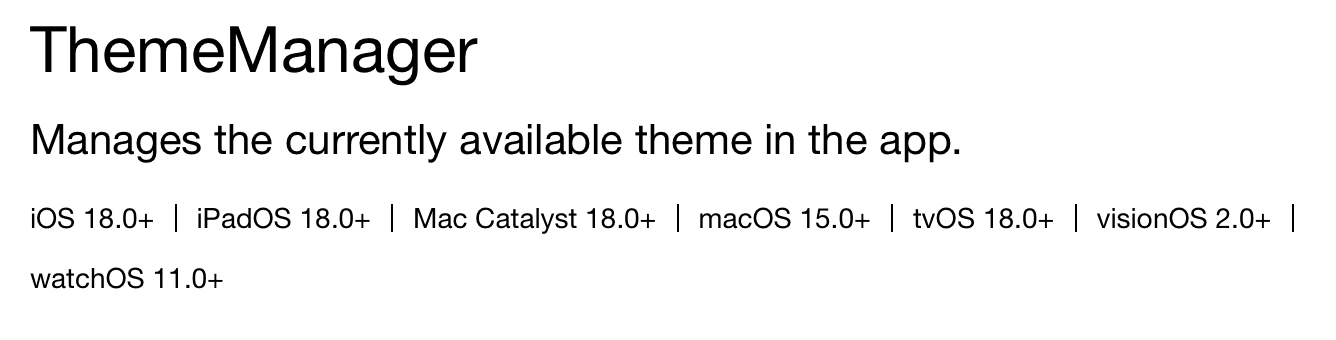
Next we update the Info.plist inside the .docc catalog. In the previous post, CDAppleDefaultAvailability defined the supported platforms for a single target. Now that the documentation contains symbols from multiple targets, each documented target needs its own key:
<key>CDAppleDefaultAvailability</key>
<dict>
    <key>TargetA</key>
    <array>
        <dict>
            <key>name</key>
            <string>iOS</string>
            <key>version</key>
            <string>18.0</string>
        </dict>
        <dict>
            <key>name</key>
            <string>macOS</string>
            <key>version</key>
            <string>15.0</string>
        </dict>
    </array>
+
+   <key>TargetB</key>
+   <array>
+       <dict>
+           <key>name</key>
+           <string>iOS</string>
+           <key>version</key>
+           <string>18.0</string>
+       </dict>
+       <dict>
+           <key>name</key>
+           <string>macOS</string>
+           <key>version</key>
+           <string>15.0</string>
+       </dict>
+   </array>
</dict>
This is necessary to generate the list of supported platforms that is displayed below each type in the final documentation.
Linking Targets in the Documentation Catalog
Each target should also be represented inside the documentation catalog itself. For every target that should appear in the generated documentation, we create a corresponding Markdown file inside the .docc catalog. I personally like to keep these in a Frameworks directory:
Sources
└── Documentation.docc
    ├── Frameworks
    │   ├── TargetA.md
    │   └── TargetB.md
    ├── Resources
    ├── Tutorials
    ├── Info.plist
    └── Overview.md
The file does not need much content, just a declaration of the target symbol:
# ``TargetA``I tend to "link" each target from the main documentation entry page, for example if the overview page is annoted with @TechnologyRoot, I place them into a Targets section:
### Targets

This package exposes multiple targets. The following targets are included in the generated documentation:

- ``TargetA``
- ``TargetB``
This step is easy to forget but important: DocC needs an article page that references each target symbol. Without it, the symbols may be generated correctly while the target never surfaces in the navigation sidebar of the documentation. At least this was the case for me, otherwise I was not able to generate a section for each target in the sidebar of the documentation page.
Generating Symbol Graphs
In order for DocC to know which symbols are available we need to generate the symbol graphs. In order to better organise them during our build of the package, we organise them in one central place:
SYMBOL_GRAPHS_DIR="${BUILD_DIR}/symbol-graphs"Putting the symbol graphs from all targets and platforms in one place lets DocC produce a single archive that merges them, including the per-platform availability badges you see on each symbol.
The function that builds one scheme for one platform looks like this:
build_for_platform() {
    local LOC_SYMBOL_GRAPHS_DIR=$1
    local LOC_DERIVED_DATA_DIR=$2
    local LOC_PLATFORM=$3
    local LOC_SCHEME=$4

    echo "  📂 SYMBOL_GRAPHS_DIR: ${LOC_SYMBOL_GRAPHS_DIR}"
    echo "  📂 DERIVED_DATA_DIR: ${LOC_DERIVED_DATA_DIR}"
    echo "  🎯 PLATFORM: ${LOC_PLATFORM}"
    echo "  📦 SCHEME: ${LOC_SCHEME}"

    mkdir -p "${LOC_SYMBOL_GRAPHS_DIR}"

    xcodebuild build \
        -scheme "${LOC_SCHEME}" \
        -destination "${LOC_PLATFORM}" \
        -derivedDataPath "${LOC_DERIVED_DATA_DIR}" \
        DOCC_EXTRACT_EXTENSION_SYMBOLS=YES \
        OTHER_SWIFT_FLAGS="-Xfrontend -emit-symbol-graph -Xfrontend -emit-symbol-graph-dir -Xfrontend ${LOC_SYMBOL_GRAPHS_DIR} -Xfrontend -emit-extension-block-symbols" | xcbeautify
}
I want to highlight two flags from above. DOCC_EXTRACT_EXTENSION_SYMBOLS=YES combined with -emit-extension-block-symbols, includes symbols for extensions and including extensions you declare on types from other modules. This is especially useful if you extend common types from any of the platform SDKs. Omitting these flags will lead to these extentions not showing up in your documentation.
I use xcbeautify to make the xcodebuild output readable, if you do not use it you can safely remove it.
Compared to the original script, the important change is that the scheme is now passed in explicitly, which makes the function reusable for every target.
Building Every Target for Every Platform
Next, we define the supported platforms of the package. In this example, every possible Apple platform. You can adjust it to just the platforms you support. Its very similar to the original script, the only difference is that we omit a per platform symbol graph directory. These directories are now automatically derived by the platform.
platforms=(
    "iOS,📱"
    "watchOS,⌚"
    "visionOS,🕶️"
    "tvOS,📺"
    "macOS,💻"
)
Each entry pairs the platform name with an icon used only for nicer logging. The script takes the list, iterates over it for every scheme we declare and builds it for that particular platform.
for SCHEME in "${SCHEMES[@]}"; do
    echo "Building documentation symbols for ${SCHEME}"

    for input in "${platforms[@]}"; do
        IFS="," read -r platform icon <<<"${input}"

        platform_symbol_graphs_dir="${SYMBOL_GRAPHS_DIR}/${SCHEME}/${platform}"

        echo "${icon} Building ${SCHEME} for ${platform}"

        build_for_platform \
            "${platform_symbol_graphs_dir}" \
            "${DERIVED_DATA_DIR}" \
            "generic/platform=${platform}" \
            "${SCHEME}"
    done
done
After this step, the symbol-graph directory should look like this:
.build
└── symbol-graphs
    ├── TargetA
    │   ├── iOS
    │   ├── watchOS
    │   ├── visionOS
    │   ├── tvOS
    │   └── macOS
    └── TargetB
        ├── iOS
        ├── watchOS
        ├── visionOS
        ├── tvOS
        └── macOS
If a target does not support every platform, you can also modify the script to use a per-target platform list instead of one global platforms array.
Creating the DocC Archive
After all targets have been built and all symbol graphs are created we can hand them over to DocC and produce a single .doccarchive:
xcrun docc convert "${DOCC_BUNDLE_PATH}" \
    --fallback-display-name "${FALLBACK_DISPLAY_NAME}" \
    --fallback-bundle-identifier "${FALLBACK_BUNDLE_IDENTIFIER}" \
    --fallback-bundle-version 1 \
    --output-dir "${DOCCARCHIVE_PATH}" \
    --additional-symbol-graph-dir "${SYMBOL_GRAPHS_DIR}"
The DocC binary receives the .docc catalog through DOCC_BUNDLE_PATH and every generated symbol graph through --additional-symbol-graph-dir. This is the step where the catalog and the symbols are combined into one archive.
DocC can also emit an experimental Markdown rendering of each page alongside
the HTML, via --enable-experimental-markdown-output (plus
--enable-experimental-markdown-output-manifest for its manifest).
That is handy if you want machine-readable docs, for example to feed into an
LLM, but it is not needed for the hosted website, so I leave it out here. Add
the flags to the docc convert call if you want.
Versioned Documentation
Having the actual .doccarchive ready, we can now make the next step and talk about the actual website generation and versioning of documentation.
Please recall the target layout from the beginning of the post: each version lives in its own folder, with the shared assets (versions.json, the picker files, the redirects) at the root.
This post focuses on GitHub Pages deploying from a gh-pages branch, but the approach is not GitHub-specific. Any static host that can serve the structure explained here.
When I in the next part of this post talk about a latest version, I mean the version of the documentation that originates from the main branch. You can of course change this naming convention to your own needs, because what works for me might not work for you.
Understanding the Base Path
The most important value in the versioning setup is the base path. For a GitHub Pages project site, it is the repository name:
SITE_BASE_PATH="/repository-name"If your are using the GitHub pages feature on github.com, your documentation will be hosted at https://example-user.github.io/repository-name/, then SITE_BASE_PATH is /repository-name. Crucially, the base path does not include the version, that is appended separately:
HOSTING_BASE_PATH="${SITE_BASE_PATH}/${VERSION}"This value shows up in the build script, the deploy script, and the injected JavaScript, and they all have to match. The table below should make the usage of the values more crisp:
| Value | Example | Purpose |
|---|---|---|
SITE_BASE_PATH | /repository-name | The stable root path of the documentation site |
VERSION | 1.1.0 | The documentation version currently being built |
HOSTING_BASE_PATH | /repository-name/1.1.0 | The full path passed to DocC during static hosting transformation |
SITE_ROOT | /repository-name/ | The root path used by the version picker JavaScript |
Our shared assets, version-picker.js, version-picker.css, and versions.json are loaded from SITE_BASE_PATH, never from the versioned HOSTING_BASE_PATH.
Building a Specific Documentation Version
Before we can start deploying we need to enhance the build script by giving it access to version of the documentation that is about to get build by introducing a DOCS_VERSION environment variable, which falls back to latest if it is not set:
VERSION="${DOCS_VERSION:-latest}" # fallback to 'latest' if no value is provided

SITE_BASE_PATH="/repository-name"
HOSTING_BASE_PATH="${SITE_BASE_PATH}/${VERSION}"
Simply running the script without the variable will yield a latest documentation while having the variable being set, would yield a documentation with the specific version set:
# yields `latest`
./build-documentation.sh

# yields 1.1.0 documentation
DOCS_VERSION="1.1.0" ./build-documentation.sh
Preparing the Static Website
The final step is to run the process-archive action from docc which is then bound to the specific version baked into the HOSTING_BASE_PATH.
xcrun docc process-archive \
    transform-for-static-hosting "${DOCCARCHIVE_PATH}" \
    --output-path "${WEBSITE_OUTPUT_PATH}" \
    --hosting-base-path "${HOSTING_BASE_PATH}"
At this point, .docs-out holds the static website for a specific version. We then inject a small script into every generated index.html, loaded from SITE_BASE_PATH so it is shared across all versions:
PICKER_SCRIPT="<script defer src=\"${SITE_BASE_PATH}/version-picker.js\"></script>"

find "${WEBSITE_OUTPUT_PATH}" -name 'index.html' -exec \
    perl -pi -e "s|</body>|${PICKER_SCRIPT}</body>|" {} +
Finally, the build writes the current version into a small metadata file the deploy script will read:
echo "${VERSION}" > "${WEBSITE_OUTPUT_PATH}/.docs-version"The build script now is no longer tied to a single target or output location. It collects symbol graphs for every configured scheme and platform, produces one combined archive, and generates a static site for one specific version.
Version Picker
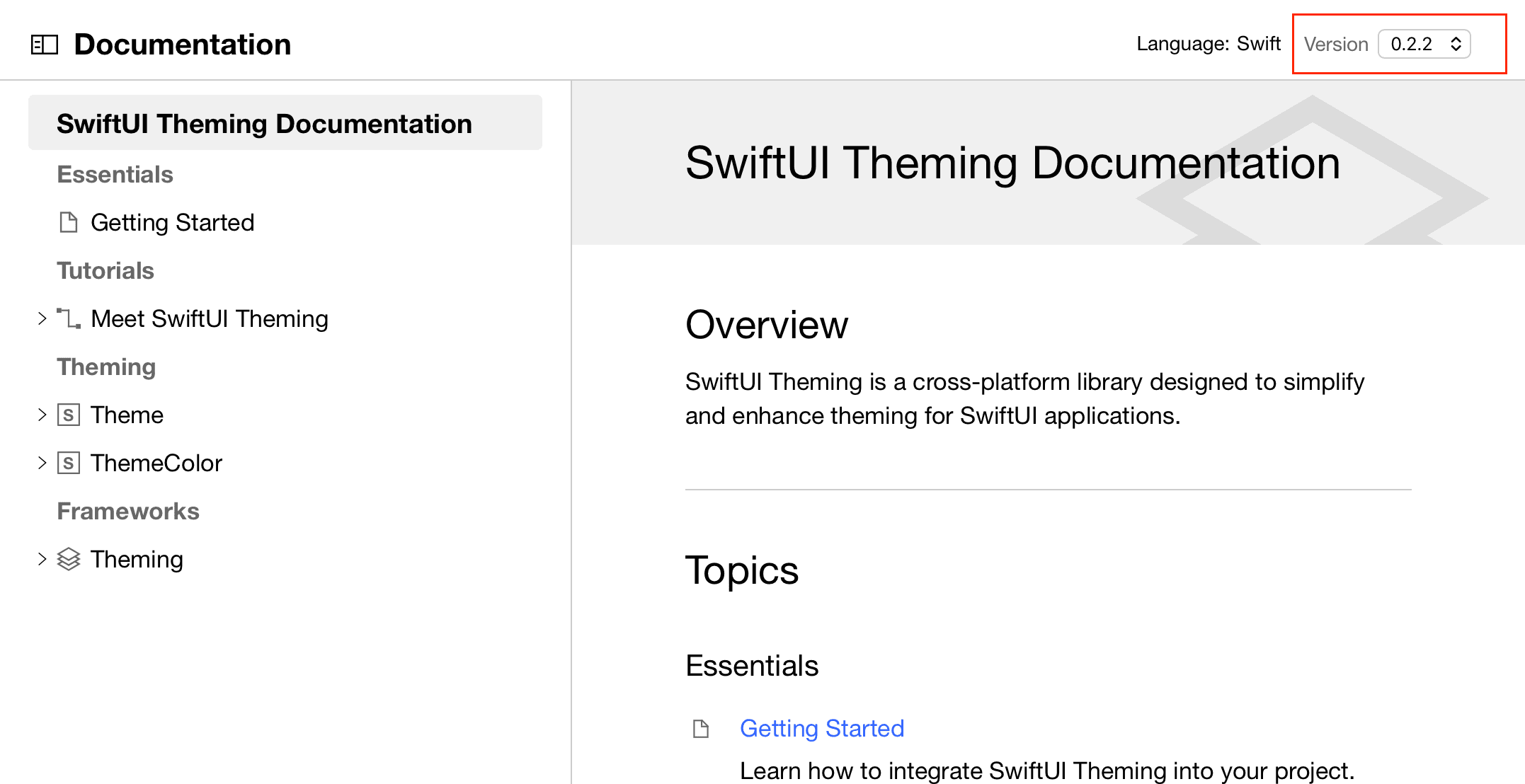
In order to let the readers of our documentation switch between versions we need to introduce a version picker to the DocC generated website. We do this by injecting a .css and js file.
docs
└── assets
    ├── version-picker.css
    └── version-picker.js
These get copied to the root of the gh-pages branch during deployment and are shared by every version. You can keep them anywhere in your repository; the examples uses ./docs/assets.
Styling the Version Picker
The CSS is intentionally small. It adds a compact select control to the DocC navigation and reuses DocC's color variables where possible:
.version-picker {
  display: flex;
  align-items: center;
  gap: 6px;
  margin-left: auto;
  padding: 0 16px;
  font-size: 14px;
}

.version-picker-label {
  color: var(--color-figure-gray-secondary, #6e6e73);
  white-space: nowrap;
}

.version-picker-select {
  appearance: auto;
  background: var(--color-fill, #fff);
  border: 1px solid var(--color-grid, #d2d2d7);
  border-radius: 4px;
  color: var(--color-text, #1d1d1f);
  font-size: 13px;
  padding: 4px 8px;
  cursor: pointer;
}

body[data-color-scheme="dark"] .version-picker-select {
  background: var(--color-fill, #1c1c1e);
  border-color: var(--color-grid, #424245);
  color: var(--color-text, #f5f5f7);
}
The class names are prefixed with version-picker to stay clear of DocC's own classes. The result will look like this in the final website:
Injecting the Version Picker
In order for the picker to work correctly it needs to load the available versions of the documentation and handles the redirect to the selected value. We can load the available versions from a .version.json file that we maintain during deployment. This file contains an array of the available versions and the URL we want the user to be redirected to, once they select a version.
To load the versions, the script uses the same base path as the shell scripts, with a trailing slash:
var SITE_ROOT = '/repository-name/';Our versions.json will look like something like this.
[
  {
    "version": "latest",
    "url": "/repository-name/latest/documentation/overview/"
  },
  {
    "version": "1.1.0",
    "url": "/repository-name/1.1.0/documentation/overview/"
  },
  {
    "version": "1.0.0",
    "url": "/repository-name/1.0.0/documentation/overview/"
  }
]
Because the picker injects UI into DocC's generated HTML, the script is very defensive, it tries a few navigation selectors and falls back to inserting the picker at the top of the page.
Since we are injecting JavaScript and CSS into an "unowned" generation process, future releases of Xcode or DocC could potentially break our scripts. Therefore we always have to pay attention during tooling updates.
Deploying Versioned Documentation
Coming to the final part, the deploy script. It takes the generated .docs-out folder and publishes it to gh-pages. Below you can find a small diagram showing the flow:
.docs-out/                      (built for one version)
  ↓ read .docs-version
temporary git worktree (gh-pages, detached)
  ↓ copy into <version>/
gh-pages/<version>/documentation
  ↓ update versions.json + shared assets + redirects
  ↓ commit
origin/gh-pages                 (push)
The script uses a temporary Git worktree for the gh-pages content. The main reason is to keep the generated site and the gh-pages checkout entirely out of real working tree. The worktree is detached, so it does not require gh-pages to be checked out directly, which also avoids conflicts if the branch is already used elsewhere.
The script also writes a .nojekyll file. GitHub Pages runs Jekyll by default, and Jekyll silently drops files and folders whose names start with an underscore, which DocC's output contains. Without .nojekyll, the site will simply not render or will be rendered partially borken.
The first time the deploy script runs against an existing, unversioned
gh-pages branch, it wipes the current layout on the branch to migrate to the
versioned structure. This is destructive operation. If you already
have a docs site on gh-pages, make sure it is reproducible from
your build before running the deploy script.
Automating the Build in CI
If you want to automate the deplyoment of your documentation you can run the scripts onmodified on the CI. The only thing neccesary is to decide which version to build and pass it through DOCS_VERSION:
if [[ "${GITHUB_REF_TYPE}" == "tag" ]]; then
    DOCS_VERSION="${GITHUB_REF_NAME#v}"
fi
By not setting DOCS_VERSION when building the docs on the main branc we are building a latest documentation. If we are pushing a tag, we are setting the tag as the version and then building a version number specific documentation:
push to main     -> DOCS_VERSION=latest
push tag v1.2.0  -> DOCS_VERSION=1.2.0
push tag 1.2.0   -> DOCS_VERSION=1.2.0
An example GitHub workflow file which publishes my documentation can be found here:
Full Scripts
Please find all scripts for the setup we have discussed above here. Before using them please make sure to adjust:
SCHEMESSITE_BASE_PATHFALLBACK_BUNDLE_IDENTIFIERFALLBACK_DISPLAY_NAMEASSETS_DIR- the supported platforms
build-documentation.sh
#!/usr/bin/env bash

set -euo pipefail

SCHEMES=("TargetA" "TargetB")

DOCC_BUNDLE_PATH="./Sources/Documentation.docc"

DERIVED_DATA_DIR=".deriveddata"
BUILD_DIR="${PWD}/.build"
SYMBOL_GRAPHS_DIR="${BUILD_DIR}/symbol-graphs"

WEBSITE_OUTPUT_PATH="${PWD}/.docs-out"
FALLBACK_BUNDLE_IDENTIFIER="com.example.package"
FALLBACK_DISPLAY_NAME="MyPackage"

DOCCARCHIVE_PATH="${PWD}/${FALLBACK_DISPLAY_NAME}.doccarchive"

VERSION="${DOCS_VERSION:-latest}"

SITE_BASE_PATH="/repository-name"
HOSTING_BASE_PATH="${SITE_BASE_PATH}/${VERSION}"

platforms=(
    "iOS,📱"
    "watchOS,⌚"
    "visionOS,🕶️"
    "tvOS,📺"
    "macOS,💻"
)

build_for_platform() {
    local LOC_SYMBOL_GRAPHS_DIR=$1
    local LOC_DERIVED_DATA_DIR=$2
    local LOC_PLATFORM=$3
    local LOC_SCHEME=$4

    echo "  📂 SYMBOL_GRAPHS_DIR: ${LOC_SYMBOL_GRAPHS_DIR}"
    echo "  📂 DERIVED_DATA_DIR: ${LOC_DERIVED_DATA_DIR}"
    echo "  🎯 PLATFORM: ${LOC_PLATFORM}"
    echo "  📦 SCHEME: ${LOC_SCHEME}"

    mkdir -p "${LOC_SYMBOL_GRAPHS_DIR}"

    # NOTE: the pipe to xcbeautify only fails correctly because of
    # `set -o pipefail` above. Keep pipefail, or a failed xcodebuild
    # will be masked by a successful xcbeautify.
    xcodebuild build \
        -scheme "${LOC_SCHEME}" \
        -destination "${LOC_PLATFORM}" \
        -derivedDataPath "${LOC_DERIVED_DATA_DIR}" \
        DOCC_EXTRACT_EXTENSION_SYMBOLS=YES \
        OTHER_SWIFT_FLAGS="-Xfrontend -emit-symbol-graph -Xfrontend -emit-symbol-graph-dir -Xfrontend ${LOC_SYMBOL_GRAPHS_DIR} -Xfrontend -emit-extension-block-symbols" | xcbeautify
}

echo "📚 Building documentation version ${VERSION}"
echo "🌍 Hosting base path: ${HOSTING_BASE_PATH}"

rm -rf "${SYMBOL_GRAPHS_DIR}"
rm -rf "${DOCCARCHIVE_PATH}"
rm -rf "${WEBSITE_OUTPUT_PATH}"

mkdir -p "${SYMBOL_GRAPHS_DIR}"

for SCHEME in "${SCHEMES[@]}"; do
    echo "Building documentation symbols for ${SCHEME}"

    for input in "${platforms[@]}"; do
        IFS="," read -r platform icon <<<"${input}"

        platform_symbol_graphs_dir="${SYMBOL_GRAPHS_DIR}/${SCHEME}/${platform}"

        echo "${icon} Building ${SCHEME} for ${platform}"

        build_for_platform \
            "${platform_symbol_graphs_dir}" \
            "${DERIVED_DATA_DIR}" \
            "generic/platform=${platform}" \
            "${SCHEME}"
    done
done

echo "📦 Creating .doccarchive"

xcrun docc convert "${DOCC_BUNDLE_PATH}" \
    --fallback-display-name "${FALLBACK_DISPLAY_NAME}" \
    --fallback-bundle-identifier "${FALLBACK_BUNDLE_IDENTIFIER}" \
    --fallback-bundle-version 1 \
    --output-dir "${DOCCARCHIVE_PATH}" \
    --additional-symbol-graph-dir "${SYMBOL_GRAPHS_DIR}"

echo "⚙️  Processing .doccarchive"

mkdir -p "${WEBSITE_OUTPUT_PATH}"

xcrun docc process-archive \
    transform-for-static-hosting "${DOCCARCHIVE_PATH}" \
    --output-path "${WEBSITE_OUTPUT_PATH}" \
    --hosting-base-path "${HOSTING_BASE_PATH}"

echo "🔧 Injecting version picker script"

PICKER_SCRIPT="<script defer src=\"${SITE_BASE_PATH}/version-picker.js\"></script>"

find "${WEBSITE_OUTPUT_PATH}" -name 'index.html' -exec \
    perl -pi -e "s|</body>|${PICKER_SCRIPT}</body>|" {} +

echo "${VERSION}" > "${WEBSITE_OUTPUT_PATH}/.docs-version"

# Clean up build artifacts. Remove the DerivedData line if you want to
# cache it between CI runs (see "A Note on Build Time").
rm -rf "${DERIVED_DATA_DIR}"
rm -rf "${BUILD_DIR}"
rm -rf "${DOCCARCHIVE_PATH}"

echo "✅ Documentation built successfully"
deploy-documentation.sh
#!/usr/bin/env bash

set -euo pipefail

readonly DOCS_DIR="${PWD}/.docs-out"
readonly GH_PAGES_BRANCH="gh-pages"
readonly REMOTE="origin"
readonly ORIGINAL_DIR="${PWD}"

readonly SITE_BASE_PATH="/repository-name"
readonly ASSETS_DIR="${PWD}/docs/assets"

WORKTREE_DIR=""

VERSION=$(cat "${DOCS_DIR}/.docs-version" 2>/dev/null || echo "latest")

cleanup_worktree() {
    if [[ -n "${WORKTREE_DIR}" && -d "${WORKTREE_DIR}" ]]; then
        cd "${ORIGINAL_DIR}"
        git worktree remove --force "${WORKTREE_DIR}" 2>/dev/null || true
        rm -rf "${WORKTREE_DIR}" 2>/dev/null || true
    fi
}

check_prerequisites() {
    if [[ ! -d "${DOCS_DIR}" ]]; then
        echo "❌ Error: ${DOCS_DIR} directory not found" >&2
        echo "Run the documentation build first." >&2
        exit 1
    fi

    if [[ ! -f "${DOCS_DIR}/index.html" ]]; then
        echo "❌ Error: ${DOCS_DIR} appears incomplete. No index.html found." >&2
        exit 1
    fi

    if [[ ! -f "${ASSETS_DIR}/version-picker.js" ]]; then
        echo "❌ Error: version-picker.js not found in ${ASSETS_DIR}" >&2
        exit 1
    fi

    if [[ ! -f "${ASSETS_DIR}/version-picker.css" ]]; then
        echo "❌ Error: version-picker.css not found in ${ASSETS_DIR}" >&2
        exit 1
    fi
}

ensure_gh_pages_branch_exists() {
    if git show-ref --verify --quiet "refs/heads/${GH_PAGES_BRANCH}"; then
        echo "ℹ️  Using existing local ${GH_PAGES_BRANCH} branch"
        return
    fi

    if git show-ref --verify --quiet "refs/remotes/${REMOTE}/${GH_PAGES_BRANCH}"; then
        echo "ℹ️  Fetching ${GH_PAGES_BRANCH} from ${REMOTE}"
        git fetch "${REMOTE}" "${GH_PAGES_BRANCH}:${GH_PAGES_BRANCH}"
        return
    fi

    echo "ℹ️  Creating new ${GH_PAGES_BRANCH} branch"

    git switch --orphan "${GH_PAGES_BRANCH}"
    git rm -rf . 2>/dev/null || true
    git commit --allow-empty -m "docs: initialize gh-pages branch"
    git push -u "${REMOTE}" "${GH_PAGES_BRANCH}"
    git switch -
}

update_versions_manifest() {
    local version="$1"
    local manifest="./versions.json"

    python3 - "$manifest" "$version" "$SITE_BASE_PATH" <<'PY'
import json
import re
import sys
from pathlib import Path

manifest_path = Path(sys.argv[1])
version = sys.argv[2]
site_base_path = sys.argv[3]

if manifest_path.exists():
    versions = json.loads(manifest_path.read_text())
else:
    versions = []

entry = {
    "version": version,
    "url": f"{site_base_path}/{version}/documentation/overview/"
}

versions = [item for item in versions if item["version"] != version]
versions.append(entry)

# NOTE: this sorts purely on the numeric components of the version string.
# Pre-release tags like "1.2.0-beta.1" will sort by their digits and may end
# up in an unexpected place. Adjust sort_key if you publish pre-release docs.
def sort_key(item):
    version = item["version"]

    if version == "latest":
        return (0, [])

    parts = [int(part) for part in re.findall(r"\d+", version)]
    return (1, [-part for part in parts])

versions.sort(key=sort_key)

manifest_path.write_text(json.dumps(versions, indent=2) + "\n")
PY
}

generate_root_redirect() {
    cat > ./index.html <<EOF
<!DOCTYPE html>
<html>
<head>
  <meta charset="utf-8">
  <meta http-equiv="refresh" content="0; url=latest/documentation/overview/">
  <title>Redirecting...</title>
  <script>window.location.replace("latest/documentation/overview/");</script>
</head>
<body>
  <p>Redirecting to <a href="latest/documentation/overview/">latest documentation</a>...</p>
</body>
</html>
EOF
}

generate_404_page() {
    cat > ./404.html <<EOF
<!DOCTYPE html>
<html>
<head>
  <meta charset="utf-8">
  <title>Page Not Found</title>
  <script>
    var path = window.location.pathname;
    var base = '${SITE_BASE_PATH}/';

    if (path.startsWith(base)) {
      var rest = path.substring(base.length);

      if (rest && !rest.startsWith('latest/') && !/^\\d+\\.\\d+/.test(rest)) {
        window.location.replace(base + 'latest/' + rest);
      }
    }
  </script>
</head>
<body>
  <p>Page not found. <a href="${SITE_BASE_PATH}/latest/documentation/overview/">Go to documentation</a>.</p>
</body>
</html>
EOF
}

deploy_version() {
    local target_version="$1"

    echo "🧹 Cleaning ${target_version}/"
    rm -rf "./${target_version}"
    mkdir -p "./${target_version}"

    echo "📋 Copying documentation to ${target_version}/"
    cp -R "${DOCS_DIR}/." "./${target_version}/"
    rm -f "./${target_version}/.docs-version"

    echo "📝 Updating versions.json for ${target_version}"
    update_versions_manifest "${target_version}"
}

deploy_with_worktree() {
    WORKTREE_DIR=$(mktemp -d "${TMPDIR:-/tmp}/docc-gh-pages.XXXXXX")

    echo "📁 Creating temporary worktree at ${WORKTREE_DIR}"

    git worktree prune
    git worktree add --detach "${WORKTREE_DIR}" "${GH_PAGES_BRANCH}"

    cd "${WORKTREE_DIR}"

    # One-time, destructive migration: if there is no versions.json, this is
    # an old flat (unversioned) gh-pages branch. Wipe it before laying down
    # the versioned structure.
    if [[ ! -f ./versions.json ]]; then
        echo "🔄 Migrating to versioned documentation layout"
        find . -maxdepth 1 \
            -not -name '.git' \
            -not -name '.' \
            -not -name '..' \
            -exec rm -rf {} +
    fi

    deploy_version "${VERSION}"

    echo "📦 Updating shared assets"
    cp "${ASSETS_DIR}/version-picker.js" ./version-picker.js
    cp "${ASSETS_DIR}/version-picker.css" ./version-picker.css

    generate_root_redirect
    generate_404_page

    touch .nojekyll

    git add --all

    if git diff --quiet && git diff --cached --quiet; then
        echo "ℹ️  No changes to deploy"
        return 0
    fi

    SOURCE_COMMIT=$(git -C "${ORIGINAL_DIR}" rev-parse HEAD)

    echo "💾 Committing changes"
    git commit -m "docs: deploy ${VERSION} documentation from ${SOURCE_COMMIT}"

    echo "🚀 Pushing to ${REMOTE}/${GH_PAGES_BRANCH}"
    git push "${REMOTE}" "HEAD:${GH_PAGES_BRANCH}"
}

main() {
    echo "📚 Deploying documentation version ${VERSION} to ${GH_PAGES_BRANCH}"

    check_prerequisites
    ensure_gh_pages_branch_exists
    deploy_with_worktree
    cleanup_worktree

    echo "✅ Documentation deployed successfully"
}

trap cleanup_worktree EXIT ERR INT TERM

main
version-picker.css
.version-picker {
  display: flex;
  align-items: center;
  gap: 6px;
  margin-left: auto;
  padding: 0 16px;
  font-size: 14px;
}

.version-picker-label {
  color: var(--color-figure-gray-secondary, #6e6e73);
  white-space: nowrap;
}

.version-picker-select {
  appearance: auto;
  background: var(--color-fill, #fff);
  border: 1px solid var(--color-grid, #d2d2d7);
  border-radius: 4px;
  color: var(--color-text, #1d1d1f);
  font-size: 13px;
  padding: 4px 8px;
  cursor: pointer;
}

body[data-color-scheme="dark"] .version-picker-select {
  background: var(--color-fill, #1c1c1e);
  border-color: var(--color-grid, #424245);
  color: var(--color-text, #f5f5f7);
}
version-picker.js
(function () {
  'use strict';

  var SITE_ROOT = '/repository-name/';
  var VERSIONS_URL = SITE_ROOT + 'versions.json';

  function getCurrentVersion() {
    var path = window.location.pathname;

    if (path.startsWith(SITE_ROOT)) {
      var segment = path.substring(SITE_ROOT.length).split('/')[0];

      if (segment) {
        return segment;
      }
    }

    return 'latest';
  }

  function createPicker(versions, currentVersion) {
    var container = document.createElement('div');
    container.className = 'version-picker';

    var label = document.createElement('span');
    label.className = 'version-picker-label';
    label.textContent = 'Version';

    var select = document.createElement('select');
    select.className = 'version-picker-select';
    select.setAttribute('aria-label', 'Documentation version');

    versions.forEach(function (version) {
      var option = document.createElement('option');
      option.value = version.url;
      option.textContent = version.version;

      if (version.version === currentVersion) {
        option.selected = true;
      }

      select.appendChild(option);
    });

    select.addEventListener('change', function () {
      window.location.href = select.value;
    });

    container.appendChild(label);
    container.appendChild(select);

    return container;
  }

  function injectPicker(picker) {
    function tryInject() {
      var target = document.querySelector('.nav-content');

      if (!target) {
        target = document.querySelector('nav.nav');
      }

      if (!target) {
        target = document.querySelector('#app nav');
      }

      if (target && !target.querySelector('.version-picker')) {
        target.appendChild(picker);
        return true;
      }

      return false;
    }

    if (tryInject()) {
      return;
    }

    var observer = new MutationObserver(function (_, observer) {
      if (tryInject()) {
        observer.disconnect();
      }
    });

    observer.observe(document.body, {
      childList: true,
      subtree: true
    });

    setTimeout(function () {
      observer.disconnect();

      if (!document.querySelector('.version-picker')) {
        document.body.insertBefore(picker, document.body.firstChild);
      }
    }, 5000);
  }

  var css = document.createElement('link');
  css.rel = 'stylesheet';
  css.href = SITE_ROOT + 'version-picker.css';
  document.head.appendChild(css);

  fetch(VERSIONS_URL)
    .then(function (response) {
      return response.json();
    })
    .then(function (versions) {
      if (versions.length <= 1) {
        return;
      }

      var currentVersion = getCurrentVersion();
      var picker = createPicker(versions, currentVersion);

      injectPicker(picker);
    })
    .catch(function (error) {
      console.warn('Version picker: could not load versions.json', error);
    });
})();
Troubleshooting
We have covered a lot of code, files and concepts where things can go wrong. Therefore I thought it would make sense to have a small troubleshooting section here as well. If you do not face any issues, feel free to skip this section.
The Target Does Not Appear in the Generated Documentation
If a target is missing from the output, check that:
- the scheme or product actually emits symbol graphs,
- the target is in the
SCHEMESarray, - the target is listed in
CDAppleDefaultAvailability, - the target has a Markdown page in the
.docccatalog, e.g. `# ``TargetA```, - the target is linked from your overview page.
The most common issue is that the symbol graphs are generated correctly, but the target is never surfaced in navigation because nothing in the catalog references it.
The Build Fails for One Platform
The script builds every configured scheme for every configured platform, so it will fail on any unsupported target/platform combination. If a target does not support every platform, replace the global platforms array with a per-target platform configuration.
Links Break When Testing Locally
Once you set --hosting-base-path to /repository-name, the site expects to be served from that path. Opening index.html directly, or serving .docs-out from the root with something like python3 -m http.server, will cause a 404 HTTP error on every asset and link, because they are all absolute under /repository-name.
To preview locally, serve the output under the matching base path:
mkdir -p ./preview/repository-name
cp -R ./.docs-out/. ./preview/repository-name/
(cd ./preview && python3 -m http.server 8000)
Then open http://localhost:8000/repository-name/latest/documentation/. Alternatively, build a throwaway version with an empty base path purely for local inspectionm just remember the deployed site needs the real base path.
The Version Picker Does Not Appear
Check that:
version-picker.jsis at the root of the published siteversion-picker.cssis at the root of the published siteversions.jsonis at the root of the published siteSITE_ROOTinversion-picker.jsmatchesSITE_BASE_PATH- the generated pages include the injected script tag
- the browser console shows no failed request for
versions.json
Note that the picker hides itself when there is only one version, so it will not show up on your very first deploy.
The Version Picker appears, but links to the wrong Location
Almost always a base-path mismatch. Check that:
SITE_BASE_PATHdoes not include the versionHOSTING_BASE_PATHdoes include the versionSITE_ROOTincludes a trailing slashversions.jsoncontains correct absolute paths- GitHub Pages is serving from the same repository path you configured
Conclusion
That was really a lot and one of my longest posts so far.W e covered a full setup for building multi-target, multi-version DocC documentation and deploying it to GitHub Pages.
The most important to remember from this setup is the following split:
- build one static DocC website for a specific version
- deploy that website into the matching version folder
Once that structure is in place, supporting multiple released versions is straightforward. latest follows main, and tagged releases stay available under their own version numbers and can be used generically for every library.
For a real-world example, you can have a look at one of my libraries — swiftui-theming, and in particular this commit.
I wire these scripts up with mise and a GitHub Actions workflow to build and deploy automatically. I intentionally left those project-specific details out here to keep the setup generic.
Please reach out to me if you find any mistakes, or have questions or suggestions. You can find ways to contact me on my About page.
See you next time! 👋